The integration of the LCP Server in an ebook delivery platform is a critical aspect, and one many integrators struggle with at first (usually because they do not read this documentation).
This illustrates a standard processing pipeline, when the store and the ebook distributor are separate. They can be merged in one entity without problem.
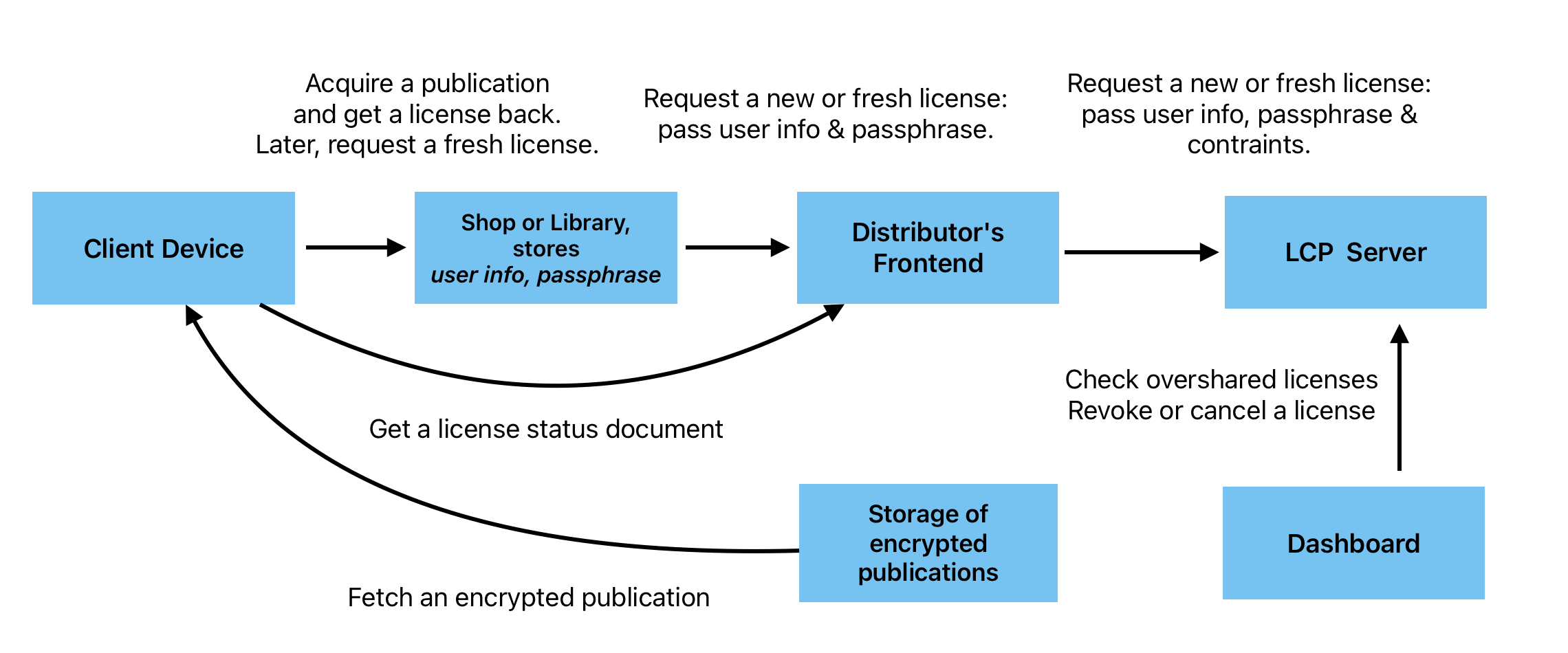
Context
The LCP Server has no clue about users’ profile. In its database, it stores a user ID for every license it generates, nothing else. The user name, email address, LCP passphrase and associated textual hint are unknown from the LCP Server; this is the only way the system can avoid duplicating a user database (with the security issues it involves) and support the evolution of user profiles in time.
Still, this information is part of any LCP license generated by the server. It must therefore be passed to the LCP Server every time an LCP license is requested. There are two situations where an LCP license is requested:
- By the ebook delivery plateform, when a transaction happens and an LCP license is generated;
- By any LCP-compliant reading application, when the status of the license has changed and a “fresh” LCP license is fetched.
To support these situations, the ebook delivery platform must be adapted as described below.
Extend the user profile
Two properties must be added to the user profile in the ebook develivery platform:
- A personal LCP passphrase, which can be chosen by the platform maintainer or by the user.
- A textual hint, which helps the user when requested to enter his passphrase on an LCP-compliant reading app.
The platform must provide a way for users to access their personal passphrase. It may be by sending them an email at the time they create an account on the platform, or by displaying the passphrase in their profil. If the passphrase is freely chosen by the user, the textual hint may also be something the user edits.
Provide a hint page
The platform must also provide a way for users to recover their passphrase if they have forgotten the current one. This information comes through the hint link present in every LCP license generated by the LCP Server.
Every LCP-compliant reading system presents the hint link at the time it requests the user passphrase.
This hint link is part of the configuration of the LCP Server, and it may be templated; the optional parameter is the license identifier, represented as {license_id}.
The target of the hint link is a Web page on the ebook delivery platform. It may present static information, or request the user to login to the platform to recover his passphrase. The passphrase may be stored by the platform, or (if only its hash is stored) the platform may create a new passphrase for the user.
Generate LCP licenses at will
The platform must send a request to the LCP Server when it needs a new LCP license. The message contains the identifier of the publication associated with the license, user information, and usage constraints.
If the request is sucessful, the LCP Server return an LCP license. The platform must parse the LCP license and store the license identifier as part of the user-publication transaction, for future use.
The mechanism by which the platform sends the LCP license to the user is left to the choice of the integrator.
Develop a license gateway
A “fresh” license is an existing license, regenerated by the LCP Server after some property of the license has changed. A fresh license is especially required after a license has been revoked or cancelled. In this case, the end date of the license has been set to the date and time of the revocation, and every reading system attempting to use the license, when online, will fetch the fresh license and store it, making them unable to open the ebook later, even if offline. A fresh license is also fetched after a loan extension and early return.
To support a request for a fresh license, the ebook delivery platform must implement what we call a “License Gateway”.
The client application will use an HTTPS GET (!) method to call the License Gateway, with a license identifier as a parameter.
The License Gateway must retrieve information about the user associated with the license (this is why the license identifier must be stored as part of the user-publication transaction), and call the Licence Server via a POST (!) request (see Fetch a Fresh License), with the license identifier and user information just retrieved. A fresh license is returned, which is then sent back to the caller application.
You can shape the URL of the fresh license as you like. For a license with id d038611c-b0b2-4afe-a23b-3322ff3e1f4b, it may be something like:
- https://yourdomain.com/somepath/d038611c-b0b2-4afe-a23b-3322ff3e1f4b
- https://yourdomain.com/somepath?license_id=d038611c-b0b2-4afe-a23b-3322ff3e1f4b
- https://yourdomain.com/somepath?user=xxx&license_id=d038611c-b0b2-4afe-a23b-3322ff3e1f4b
This URL must be expressed as a templated URL. Here is what it means for the previous examples:
- https://yourdomain.com/somepath/{license_id}
- https://yourdomain.com/somepath{?license_id}
- https://yourdomain.com/somepath?user=xxx{&licenseid}
Templated URLs must conform to RFC6570. The license identifier must be represented by the parameter {license_id}.
The templated URL associated with the License Gateway will be inserted in the LCP Server configuration, in the status section, as value of the fresh_license_link parameter.